Nomad cluster setup
Cluster architecture#
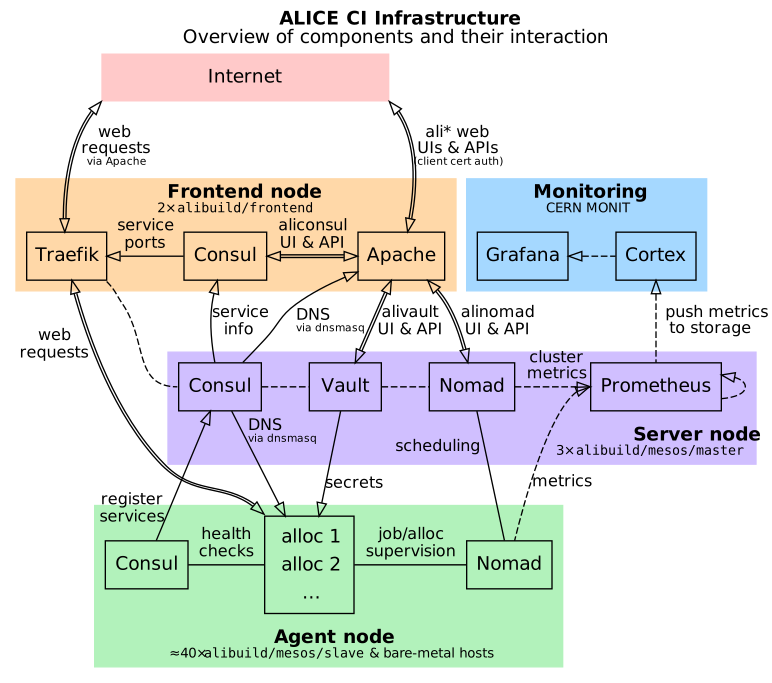
See here for an explanation of the underlying infrastructure.
Nomad, Consul and Vault setup notes#
Automated provisioning with swarm-management-mcp#
The manual procedure below is what a new node needs; on hand-managed machines it
is now driven by swarm-management-mcp,
which performs the same steps idempotently and refuses rather than half-configuring.
Its README carries the full runbook; the outline is:
-
Describe the node. Add it to
inventory.yamlwithmgmt: manual, and createnodes/<fqdn>.confwith the CPU and memory cap, the Nomad metadata, and the data directories. Anything machine-specific belongs there, so the decision is recorded in git rather than in someone's shell history. -
Install the dispatcher, once, with
bootstrap-node.sh <fqdn>. This is the only step that pushes anything to the machine. It installs a forced-commandauthorized_keysentry, so the key used afterwards can run a fixed set of verbs and cannot get a shell, and it verifies that restriction before reporting success. -
Provide the node's credentials. A per-node Consul token and the cluster's existing gossip key are read from the operator's Keychain and streamed to the node, which validates them and writes
/etc/swarm/secrets.env. They are never committed and never copied from a working tree. -
Deploy a signed revision. The node clones a pinned, signed tag from GitLab itself, so what runs is always something published and blessed rather than whatever was on someone's laptop.
-
Preview, then apply.
dry-runrenders every file that would be written and diffs it against the machine, with secrets redacted but changes still visible, and lists the commands it would run — without executing any of them.convergethen applies it. -
Verify it joined. A client can start cleanly and still fail to register, so check with
nomad node statusrather than trusting a clean exit.
Two behaviours are worth knowing because they look like failures and are not.
Converge refuses to reconfigure a dnsmasq it did not install, since on a
shared machine that resolver may be serving other hosts; adopting it is an
explicit opt-in per node. And it refuses to run without a grid host
certificate, because Nomad's TLS, Consul and Vault settings all reference one
and a node without it joins and then fails everything placed on it.
Nomad and Consul setup on non-Openstack machines#
These are the underlying steps, for reference or for a machine the tooling does not cover.
- Add Hashicorp apt repo to get modern consul/nomad packages (the Ubuntu-packaged ones are too old to work with our config):
curl -fsSL https://apt.releases.hashicorp.com/gpg | apt-key add -
cat << EOF > /etc/apt/sources.list.d/hashicorp.list
# Added <date> by <you>.
# Required for newer versions of nomad and consul -- Ubuntu repo versions are too old.
deb [arch=amd64] https://apt.releases.hashicorp.com $(lsb_release -cs) main
EOF
apt update
apt install nomad consul
systemctl stop nomad consul   # for now
mkdir /build/consul /build/nomad
chown consul:consul /build/consul
Ignore any errors about packages not being able to create directories in /opt. Jalien stuff is mounted there, and consul/nomad would only create their default data directory there (which we don't use).
2. Use consul.hcl and nomad.hcl from Puppet (use the links or get them from /etc/nomad.d / /etc/consul.d on a Puppet-managed host), but adapt by setting the correct IP address for advertise_addr and/or bind_addr, and substituting Teigi secrets manually.
Also, change the location of Grid certificates if necessary, both for nomad's multiple tls settings and for nomad's host_volumes. Nomad itself runs as root, so no filesystem ACL adjustments should be necessary (but as before, the CI should be allowed access to them via the mesos{ci,daq} users).
For alissandra machines, reserve half the resources so the CI system doesn't take up too much of the host.
3. Add a server=/consul/137.138.62.94 line to /etc/dnsmasq.conf and restart dnsmasq.service. This is required for Nomad to look up Vault hosts at vault.service.consul.
4. Start the daemons:
An autogenerated nomad-client entry for the host should now appear in consul, and the new nomad client should appear in the nomad web UI.
Vault settings applied to our cluster#
Allow Nomad clients access to secrets#
Secret substitution happens on the nomad client that receives a job. It has a nomad-server token, with which it has to get a temporary nomad token (which it in turn uses to fetch secrets).
vault write auth/token/roles/nomad-server allowed_policies='default, nomad, nomad-server' orphan=true
vault write auth/token/roles/nomad allowed_policies='default, nomad' orphan=true token_period=1d
Allow issuing essentially non-expiring tokens#
By default, tokens expire after a month, which means the nomad cluster breaks and tokens have to be manually updated.
Change the default max expiry time to 100 years instead.
Tokens can still be revoked manually using any one of the following commands:
vault token revoke '<secret token here>'
# Or alternatively:
vault token revoke -accessor '<token accessor here>'
This will revoke any child tokens of the given token as well, unless the -mode=orphan option is given.
Troubleshooting#
Leftover Consul services aren't deregistered#
Sometimes, Consul can get into a state where services were registered but never deregistered. In particular, this happens when a host changes its public IP address -- in that case, the old service remains registered because a Consul agent with the same host name is still available, even though the service's public IP address is wrong.
If this happens, deregister the service with the wrong IP manually by running the following:
ssh host-with-changed-ip.cern.ch "CONSUL_HTTP_TOKEN=$(pass .../consul-token)" consul services deregister -id offending-service-id
pass command prints out your Consul token, host-with-changed-ip is the affected hostname, and offending-service-id is the ID of the old service with the wrong IP, e.g. _nomad-client-xd2yun6h34z5nni56pdncbqb6b3mjfcf.
It is critical that the consul services deregister command runs on the host that originally registered the service.
If you run the plain consul command locally, e.g. against one of the Consul master nodes, it will fail with a "service not found" error, even if the ID is correct.